
Getting Started with ESP32 in 2026: Beyond the Basics
The Complete Advanced Guide to Mastering Modern ESP32 Development for IoT, AI, and Smart Home Applications
Table of Contents
- 1. Introduction: The ESP32 Evolution in 2026
- 2. Why ESP32 Remains the King of IoT in 2026
- 3. Understanding ESP32 Variants: S3, C6, and Beyond
- 4. Deep Dive into Hardware Architecture
- 5. Advanced Development Environment Setup
- 6. Advanced Programming Concepts
- 7. Mastering Wireless Communication
- 8. Advanced Power Management Techniques
- 9. Security Implementation for Production
- 10. Cutting-Edge Project Ideas for 2026
- 11. Advanced Troubleshooting & Optimization
- 12. Conclusion & Next Steps
1. Introduction: The ESP32 Evolution in 2026
Figure 1: The ESP32 DevKitC remains one of the most popular development boards for IoT applications in 2026
The ESP32 microcontroller has undergone a remarkable transformation since its initial release, and as we enter 2026, it has solidified its position as the undisputed champion of the Internet of Things (IoT) ecosystem. What began as a simple WiFi-enabled microcontroller has evolved into a sophisticated family of System-on-Chip (SoC) solutions capable of handling everything from basic sensor monitoring to complex edge AI processing, Matter protocol implementation, and high-speed wireless communication.
This comprehensive guide is designed for developers who have moved beyond the "blinking LED" stage and are ready to harness the full potential of modern ESP32 variants. Whether you're building smart home devices that communicate via the Matter protocol, developing battery-powered sensors that last for years, or creating edge AI applications that process data locally, this guide will provide you with the advanced knowledge and practical techniques needed to succeed in 2026's competitive IoT landscape.
2. Why ESP32 Remains the King of IoT in 2026
In an era where new microcontrollers emerge constantly, the ESP32 family continues to dominate for several compelling reasons. The ecosystem has matured exponentially, with Espressif Systems consistently pushing boundaries while maintaining backward compatibility and developer-friendly tools.
? Processing Power
Modern ESP32 variants offer up to 240MHz dual-core processors with AI acceleration instructions, capable of running TensorFlow Lite models for edge inference without cloud dependency.
Connectivity Options
From WiFi 6 (802.11ax) and Bluetooth 5.3 to Thread/Zigbee (802.15.4) for Matter protocol support, the ESP32-C6 brings enterprise-grade wireless capabilities to affordable devices.
⚡ Power Efficiency
Advanced sleep modes achieving 7µA deep sleep current, ULP coprocessors for background tasks, and WiFi 6's Target Wake Time (TWT) enable multi-year battery operation.
? Security Features
Hardware-accelerated encryption, secure boot v2, digital signature HMAC, and protected key storage meet modern IoT security standards and regulatory requirements.
? Cost Effectiveness
Despite advanced features, ESP32 modules remain highly affordable, with development boards available for under $10, making them accessible for hobbyists and scalable for commercial products.
?️ Mature Ecosystem
Arduino IDE support, ESP-IDF framework, MicroPython, Rust, and extensive community libraries mean you can develop in your preferred environment with comprehensive documentation.
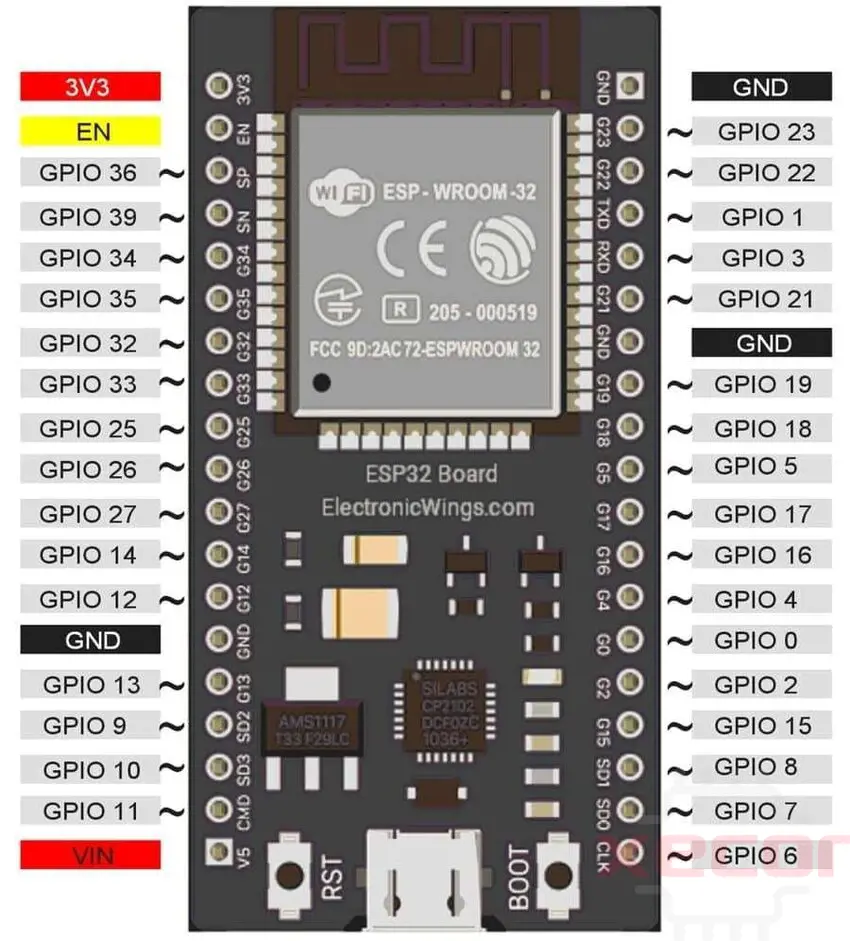
Figure 2: Comparing ESP32 capabilities with traditional Arduino boards shows the significant advantages in processing power and connectivity
3. Understanding ESP32 Variants: S3, C6, and Beyond
One of the most critical decisions in 2026 is selecting the right ESP32 variant for your specific application. Espressif has expanded the family into distinct series, each optimized for different use cases. Understanding these differences is essential for building efficient, cost-effective products.
ESP32 Family Comparison 2026
| Feature | ESP32 (Classic) | ESP32-S3 | ESP32-C6 | ESP32-C3 |
|---|---|---|---|---|
| CPU Architecture | Xtensa LX6 Dual-core @ 240MHz | Xtensa LX7 Dual-core @ 240MHz | RISC-V Single-core @ 160MHz + LP core | RISC-V Single-core @ 160MHz |
| WiFi Standard | 802.11 b/g/n (WiFi 4) | 802.11 b/g/n (WiFi 4) | 802.11ax (WiFi 6) + b/g/n | 802.11 b/g/n (WiFi 4) |
| Bluetooth | BLE 4.2 + Classic | BLE 5.0 + mesh | BLE 5.3 + Thread/Zigbee | BLE 5.0 |
| 802.15.4 (Matter) | ❌ No | ❌ No | ✅ Yes (Thread 1.3) | ❌ No |
| AI/Vector Instructions | ❌ No | ✅ Yes (SIMD/Vector) | ❌ No | ❌ No |
| USB Interface | USB-to-UART bridge | Native USB-OTG | USB Serial/JTAG | USB Serial/JTAG |
| Max GPIO | 34 | 45 | 30 | 22 |
| ADC Channels | 18 (12-bit) | 20 (12-bit) | 7 (12-bit) | 5 (12-bit) |
| Deep Sleep Current | ~10µA | ~7µA | ~7µA | ~5µA |
| Best For | General purpose, legacy projects | AI/ML, cameras, displays | Smart home, Matter, WiFi 6 | Simple IoT, cost-sensitive |
ESP32-S3: The AI and Multimedia Powerhouse
The ESP32-S3 represents Espressif's answer to the growing demand for edge AI processing. With its dual-core Xtensa LX7 architecture running at 240MHz and dedicated vector instructions for machine learning acceleration, the S3 can perform real-time inference on sensor data without requiring cloud connectivity.
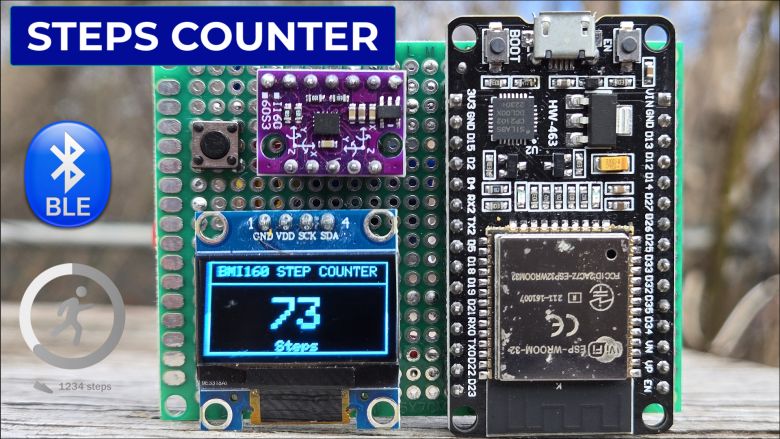
Figure 3: ESP32-S3 powered step counter project demonstrating AI capabilities with BMI160 sensor integration
Key capabilities include support for parallel RGB LCD interfaces (allowing direct connection to displays without external controllers), DVP camera interface for OV2640/OV3660 sensors, and Octal SPI supporting up to 120MB/s flash/PSRAM speeds. The native USB-OTG enables USB device emulation (keyboards, mass storage, CDC) and USB host functionality for connecting peripherals directly to the ESP32.
ESP32-C6: The Future of Smart Home Connectivity
The ESP32-C6 is Espressif's strategic response to the Matter protocol revolution and the demand for WiFi 6 in IoT devices. As the first ESP32 with 802.15.4 radio support, it enables native Thread and Zigbee communication alongside WiFi and Bluetooth LE 5.3.
WiFi 6 features like Orthogonal Frequency Division Multiple Access (OFDMA) and Target Wake Time (TWT) are game-changers for battery-powered devices. OFDMA allows the access point to serve multiple devices simultaneously, reducing latency in crowded networks. TWT enables the ESP32 to negotiate specific wake-up times with the router, sleeping for minutes at a time while maintaining connection—critical for sensors requiring multi-year battery life.
4. Deep Dive into Hardware Architecture
Understanding the Pinout and Multiplexing
Advanced ESP32 development requires intimate knowledge of pin functions and their limitations. Unlike simpler microcontrollers, ESP32 pins have multiple functions, restrictions, and special behaviors during boot that can cause mysterious failures if not properly understood.

Figure 4: Detailed ESP32 pinout diagram showing GPIO functions, ADC channels, and special purpose pins
┌─────────────────────────────────────────────────────────────────────────┐
│                    ESP32-WROOM-32 PIN REFERENCE                         │
├─────────────────────────────────────────────────────────────────────────┤
│  EN (Reset)        GPIO23 (VSPI MOSI)    GPIO22 (I2C SCL)              │
│  VIN (5V Input)    GPIO5  (VSPI CS)       GPIO1  (TXD0/U0TXD)           │
│  GND               GPIO18 (VSPI CLK)      GPIO3  (RXD0/U0RXD)           │
│  3.3V              GPIO19 (VSPI MISO)     GPIO21 (I2C SDA)              │
│                                                                             │
│  GPIO36 (ADC0)     GPIO39 (ADC3)     GPIO34 (ADC6)     GPIO35 (ADC7)     │
│  GPIO32 (ADC4)     GPIO33 (ADC5)     GPIO25 (DAC1)     GPIO26 (DAC2)     │
│                                                                             │
│  ⚠️ STRAPPING PINS (Boot Configuration):                                   │
│  GPIO0  - Must be LOW for download mode, HIGH for normal boot              │
│  GPIO2  - Must be LOW during boot (internally pulled down)                 │
│  GPIO12 - Determines flash voltage (VDD_SDIO) - BE CAREFUL!                │
│  GPIO15 - Determines silencing of boot messages                            │
└─────────────────────────────────────────────────────────────────────────┘

CRITICAL RESTRICTIONS:
• GPIO6-11: Connected to internal SPI flash - DO NOT USE
• GPIO34-39: Input-only pins (no internal pull-up/down)
• GPIO20: Not available on most packages
• ADC2 pins: Unusable when WiFi is active (use ADC1 instead)
Power Architecture and Voltage Regulation
Understanding the ESP32's power domains is essential for low-power design. The chip operates on 3.3V logic levels but contains multiple power domains that can be independently controlled. The VDD3P3_RTC domain powers the RTC (Real-Time Clock) and ULP coprocessor during deep sleep, while VDD3P3_CPU powers the main processor and can be completely shut down.
esp_err_t esp_brownout_disable(void) or adjust the threshold in menuconfig. Always include sufficient decoupling capacitors (100nF + 10µF) near the power pins to handle the current spikes during WiFi transmission (up to 500mA peak).Memory Architecture Optimization
The ESP32 features a Harvard architecture with separate instruction and data buses. The 520KB SRAM is divided into several regions: DRAM (data RAM), IRAM (instruction RAM), and RTC memory that persists during sleep. Advanced developers can optimize performance by placing critical code in IRAM using the IRAM_ATTR attribute, ensuring it remains available during flash operations.
For applications requiring large buffers (camera frames, audio processing, ML models), the ESP32-S3 supports external PSRAM (Pseudo-Static RAM) up to 16MB via Octal SPI interface running at 120MB/s. This memory appears as a contiguous block in the address space but has higher latency than internal SRAM. Use it for large datasets, keeping critical real-time code and stack in internal memory.
5. Advanced Development Environment Setup
ESP-IDF vs Arduino: Making the Right Choice
While Arduino IDE remains popular for beginners, professional ESP32 development in 2026 overwhelmingly uses the ESP-IDF (IoT Development Framework). ESP-IDF provides direct hardware access, FreeRTOS integration, comprehensive debugging support, and access to all chip features without abstraction layer limitations.
Download the ESP-IDF Tools Installer for your OS. Version 5.2 introduces improved C++ exception handling, updated WiFi 6 drivers for C6, and enhanced security features. Use the offline installer if you have unreliable internet, as it includes all required toolchains.
Install the "Espressif IDF" extension in VS Code. Configure it to use your existing ESP-IDF installation. Enable the "ESP-IDF: Monitor" shortcut for serial debugging. Set up the OpenOCD debugger for JTAG debugging with ESP-Prog or built-in USB-JTAG.
Use idf.py menuconfig to configure project settings. Critical settings include: CPU frequency (160MHz vs 240MHz), flash size and mode (QIO/DIO), partition table layout, and component-specific options like WiFi TX power and sleep modes.
For complex projects, configure JTAG debugging. Connect TDI, TDO, TMS, TCK, and GND to an ESP-Prog or compatible debugger. Use idf.py gdb for step-through debugging, variable inspection, and breakpoint management. This is invaluable for tracking down FreeRTOS task issues.
CMake and Build System Mastery
ESP-IDF uses CMake as its build system. Understanding how to properly structure CMakeLists.txt files allows you to create modular, reusable components. For large projects, organize code into components with clear dependencies:
The REQUIRES field lists public dependencies (included in headers), while PRIV_REQUIRES lists private dependencies only needed for implementation. This distinction affects build parallelization and dependency tracking.
6. Advanced Programming Concepts
FreeRTOS Task Management and Synchronization
The ESP32 runs FreeRTOS with dual-core support (SMP). Understanding task pinning, priority inheritance, and synchronization primitives is crucial for stable applications. By default, tasks run on either core ( pinning tskNO_AFFINITY), but CPU-intensive tasks should be pinned to avoid migration overhead.
Advanced Memory Management
The ESP32 provides several memory allocation strategies. malloc() allocates from the default DRAM region, while heap_caps_malloc() allows specifying capabilities (MALLOC_CAP_DMA, MALLOC_CAP_32BIT, MALLOC_CAP_SPIRAM). DMA-capable memory must be 32-bit aligned and accessible by peripherals—critical for camera and SPI transfers.
heap_caps_get_free_size() and heap_caps_get_largest_free_block() to monitor heap health. Consider using external PSRAM for large, infrequently accessed data to preserve internal RAM for critical operations.Interrupt Service Routines (ISR) Optimization
ESP32 ISRs have strict requirements: they must execute quickly, use IRAM_ATTR to avoid flash access during execution, and only call FreeRTOS ISR-safe functions (those ending in FromISR). For GPIO interrupts, use the ESP-IDF GPIO service rather than direct register manipulation for portability.
7. Mastering Wireless Communication
WiFi 6 Implementation with ESP32-C6
WiFi 6 (802.11ax) on the ESP32-C6 brings OFDMA, TWT, and BSS coloring to IoT devices. These features are not automatically enabled—they require explicit configuration through the ESP-IDF WiFi driver. OFDMA allows the AP to allocate resource units (RUs) to individual stations, reducing latency in high-density environments.
Bluetooth 5.3 and LE Audio
The ESP32-C6's Bluetooth 5.3 brings Extended Advertising, Periodic Advertising with Responses (PAwR), and LE Power Control. For audio applications, LE Audio and Auracast enable broadcast audio scenarios—think museum guides or conference systems where multiple receivers listen to a single transmitter.
Thread and Matter Protocol Implementation
Matter is the unified smart home protocol backed by Apple, Google, Amazon, and others. The ESP32-C6's built-in 802.15.4 radio allows it to act as a Thread device, while its WiFi provides internet connectivity. Espressif's Matter SDK (ESP-Matter) simplifies implementation.
Figure 5: ESP32 connectivity options showing WiFi and Bluetooth coexistence architecture
MQTT and Cloud Integration Patterns
For cloud communication, implement MQTT with TLS 1.3 encryption and certificate pinning. Use session persistence (clean_session=false) to ensure message delivery during intermittent connectivity. Implement exponential backoff for reconnection attempts to prevent overwhelming the broker during outages.
8. Advanced Power Management Techniques
Sleep Mode Deep Dive
The ESP32 offers multiple sleep modes: Active, Modem-sleep, Light-sleep, and Deep-sleep. For battery-powered sensors, Deep-sleep is typically used, but Light-sleep offers a middle ground for applications needing faster wake-up while saving power.
| Sleep Mode | Current Consumption | Wake-up Time | State Retention | Use Case |
|---|---|---|---|---|
| Active | 100-500mA | N/A | Full | Processing, WiFi TX |
| Modem-sleep | 20-30mA | <1ms | Full | WiFi connected, idle |
| Light-sleep | 0.8-2.5mA | <1ms | RAM retained | Periodic sensor reading |
| Deep-sleep | 7-150µA | ~25ms | RTC memory only | Long-term battery operation |
ULP Coprocessor Programming
The Ultra-Low-Power (ULP) coprocessor is a separate RISC-V or FSM core that runs during Deep-sleep, consuming only a few hundred microamps. It can monitor GPIOs, read ADC values, and wake the main CPU when thresholds are exceeded. This is crucial for battery-powered alert systems.
Battery Life Calculation and Optimization
Calculating actual battery life requires understanding duty cycle: the percentage of time spent awake versus sleeping. For a sensor waking every 10 minutes, reading for 5 seconds, then sleeping, the duty cycle is 0.83%.
Battery Life (hours) = Battery Capacity (mAh) / (Sleep Current + (Active Current × Duty Cycle))Example: 2000mAh battery, 10µA sleep, 100mA active, 0.83% duty cycle
2000 / (0.01 + (100 × 0.0083)) = 2000 / 0.84 ≈ 2380 hours (99 days)Optimization: Reduce active time by using ULP for periodic checks, batching data transmissions, and using BLE instead of WiFi for short-range communication.
9. Security Implementation for Production
Secure Boot and Flash Encryption
Secure Boot ensures only cryptographically signed firmware runs on the device, preventing malicious code injection. Flash Encryption encrypts the firmware stored in external flash, preventing intellectual property theft and tampering. These features are one-time programmable via eFuses—mistakes can brick the device.
Run idf.py menuconfig → Security Features → Enable Secure Boot. Generate signing keys using espsecure.py generate_signing_key secure_boot_signing_key.pem. Build and flash with idf.py bootloader-flash first, then flash the signed app.
In menuconfig, enable Flash Encryption in Development or Release mode. Development mode allows re-flashing; Release mode is permanent. Generate encryption key or let the device generate it internally. Flash encryption happens automatically on first boot.
Use the ESP32's HMAC and Digital Signature peripherals to store private keys in eFuse. These keys never leave the chip and can be used for TLS client certificate authentication or secure cloud onboarding without exposing credentials.
Over-the-Air (OTA) Updates with Rollback
Implementing robust OTA requires more than just downloading firmware. Include signature verification, automatic rollback on failure, and A/B partitioning. The ESP-IDF OTA system maintains two app partitions: factory and OTA. If the new firmware crashes, the bootloader reverts to the previous version.
10. Cutting-Edge Project Ideas for 2026
? Matter-Compatible Smart Thermostat
Build a thermostat using ESP32-C6 that works with Apple HomeKit, Google Home, and Alexa simultaneously via Matter. Features include predictive heating using local weather APIs, occupancy detection via PIR/毫米波 radar, and 2-year battery life using TWT scheduling.
? Edge AI Security Camera
Use ESP32-S3 with OV3660 camera to run TensorFlow Lite object detection locally. Detect humans, vehicles, or packages and only upload alerts, preserving bandwidth and privacy. Implement face recognition for family member identification.
? Precision Agriculture Monitor
Solar-powered soil monitoring system using ESP32-C6's low-power capabilities. Measures soil moisture, NPK levels, temperature, and pH. Uses LoRaWAN for long-range communication in rural areas where WiFi is unavailable.
? Predictive Maintenance Sensor
Vibration analysis using ESP32-S3's accelerometer and ML. Monitor industrial equipment bearings and motors, predicting failures weeks in advance. Transmit data via MQTT to Grafana dashboards for visualization.
? LE Audio Broadcast System
Create an Auracast-compatible broadcast system using ESP32-C6. Deploy in museums, airports, or theaters where users can receive audio directly to their hearing aids or earbuds without special receivers.
⚡ Smart EV Charger Controller
Level 2 EV charger controller with load balancing, solar integration, and OCPP (Open Charge Point Protocol) communication. Uses ESP32-S3 for the HMI touchscreen and payment processing.

Figure 6: Custom ESP32 development board design showing integrated USB-C and compact form factor for IoT applications
11. Advanced Troubleshooting & Optimization
Debugging FreeRTOS Issues
FreeRTOS crashes often manifest as mysterious reboots. Enable CONFIG_FREERTOS_USE_TRACE_FACILITY and use vTaskList() to monitor stack usage. Stack overflow is common—use uxTaskGetStackHighWaterMark() to determine actual usage and increase stack sizes accordingly. For heap corruption, enable heap poisoning in menuconfig.
WiFi Connectivity Optimization
Intermittent WiFi disconnections often stem from insufficient power supply capacitance, incorrect TX power settings, or router compatibility issues. Use esp_wifi_set_max_tx_power() to reduce power if experiencing instability. Implement WiFi roaming for mobile devices using bssid_set in the sta configuration.
Performance Profiling
Use ESP-IDF's application tracing feature with SystemView to visualize task scheduling and interrupts. Enable CONFIG_ESP_SYSTEM_EVENT_TASK_STACK_SIZE monitoring if system events are dropping. Use coredump to flash for post-mortem debugging of field failures.
12. Conclusion & Next Steps
The ESP32 ecosystem in 2026 offers unprecedented capabilities for IoT developers. From the AI-accelerated ESP32-S3 handling complex machine learning at the edge to the connectivity-rich ESP32-C6 bridging smart home protocols with WiFi 6 efficiency, the platform has evolved far beyond its origins as a simple WiFi microcontroller.
Success with ESP32 requires moving beyond Arduino sketches and embracing the full capabilities of ESP-IDF: understanding FreeRTOS task management, implementing hardware security features, optimizing power consumption for multi-year battery life, and designing robust wireless communication strategies that handle real-world interference and network conditions.
- Complete the ESP-IDF Getting Started guide with native USB debugging
- Build a FreeRTOS-based project with at least 3 concurrent tasks using queues for communication
- Implement Deep-sleep with ULP wake-up achieving <100µA average current
- Create a Matter-over-Thread device using ESP32-C6 and certify it with the CSA
- Deploy TensorFlow Lite Micro on ESP32-S3 for voice or vision recognition
- Design a custom PCB with proper power management and antenna matching
? Get Started with ESP32 Development Today
FlyRobo.in offers a complete range of ESP32 development boards, sensors, and accessories to power your next IoT project. From beginner-friendly DevKitC boards to specialized ESP32-C6 and ESP32-S3 modules, we have everything you need.
Shop ESP32 Products Now
Leave a Comment